
Jenny Mod Not Working? Forge Errors & Crash Fixes (Complete Troubleshooting)
Jenny Mod not working after installation can be frustrating, especially when Minecraft crashes, Forge shows an error, or the mod simply does not appear in the game. Fortunately, most Jenny Mod problems are caused by a few common issues, such as an incorrect Minecraft version, incompatible Forge installation, misplaced JAR file, conflicting mods, or Java problems.
Before reinstalling everything, it is better to identify the exact cause of the problem. This Jenny Mod troubleshooting guide covers the most common crashes, Forge errors, loading problems, Exit Code errors, missing characters, and other issues that players may experience.
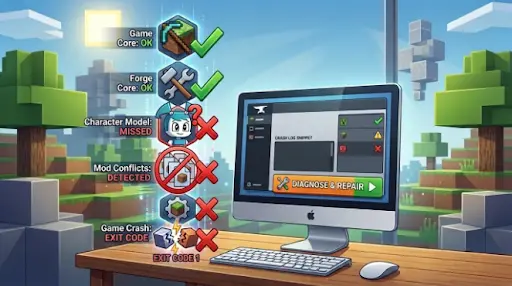
Why Is Jenny Mod Not Working?
Jenny Mod depends on several components working together. Your Minecraft version, Forge version, Jenny Mod file, Java installation, and other installed mods must all be compatible.
If even one component is incorrect, Minecraft may crash or Forge may refuse to load the mod.
Wrong Minecraft Version
One of the most common problems is trying to run a Jenny Mod file with a Minecraft version it was not designed for.
Check the version of Minecraft selected in your launcher and compare it with the version supported by your Jenny Mod file.
Do not assume that a mod created for one Minecraft version will automatically work with another.
Wrong Forge Version
Forge must also match the Minecraft version you are using.
For example, installing a Forge release made for a different Minecraft version may result in startup crashes, missing mods, or compatibility errors.
Always use the Forge build intended for your specific Minecraft installation.
Jenny Mod File Is in the Wrong Folder
For a Forge-based Java installation, the Jenny Mod .jar file normally needs to be placed inside the Minecraft mods folder.
On Windows, the folder is commonly located at:
.minecraft/mods
If you placed the file inside Downloads, the main .minecraft folder, or another folder, Forge may not detect it.
If you are setting up the mod again after fixing an error, visit our Jenny Mod Minecraft page for the main installation and version information.
How to Fix Jenny Mod Crashing on Startup
If Minecraft crashes as soon as you click Play, the problem is often caused by an incompatible mod, duplicate file, or damaged JAR.
Test Jenny Mod Without Other Mods
Remove other mods from the mods folder temporarily and keep only Jenny Mod and its required dependencies. Start Minecraft again.
If the game works, add your other mods back one at a time to find the mod causing the conflict.
Check for Duplicate Mod Files
Open the mods folder and look for multiple Jenny Mod JAR files. Remove old or duplicate versions and keep only the version that matches your Minecraft and Forge setup.
Download the Mod File Again
A damaged or incomplete JAR can cause Minecraft to crash. Delete the problem file and download a fresh copy from a trusted source.
Do not rename a ZIP or EXE file to .jar. Changing the file name does not turn it into a valid Minecraft mod.
Quick Jenny Mod Troubleshooting Checklist
Before trying advanced fixes, check these basic points:
- Make sure Minecraft, Forge, and Jenny Mod versions match.
- Launch the game with the correct Forge profile.
- Check that the Jenny Mod .jar file is in the mods folder.
- Remove any duplicate or old mod files.
- Temporarily remove other mods to check for conflicts.
- Make sure Java is installed and working correctly.
- Restart the Minecraft Launcher after making changes.
- Back up important worlds before changing or removing files.
Some issues can be easier to understand when you know which in-game elements are affected, so check our Jenny Mod Characters guide for an overview.
How to Fix Forge Errors With Jenny Mod
Forge errors usually show what is causing the problem. Read the error message first instead of reinstalling Minecraft right away.
Forge Not Appearing in Minecraft Launcher
If Forge is missing from the Launcher, it may not have installed correctly. Run the correct Forge installer again, choose Install Client, then restart the Minecraft Launcher and select the Forge profile.
“Failed to Load Mod” Error
This error can happen because of:
- Wrong Minecraft version
- Wrong Forge version
- Damaged mod file
- Missing dependency
- Conflict with another mod
Try Jenny Mod in a clean Forge setup with other unnecessary mods removed.
“Missing Mods” or “Missing Dependencies” Error
Some Jenny Mod versions need additional files or dependencies. Check the requirements for your exact mod version and install only the required compatible dependency.
Jenny Mod Not Showing in the Mods List
If Minecraft starts but Jenny Mod does not appear, Forge may not be loading the mod file.
Confirm You Are Using Forge
Make sure you launched Minecraft with the Forge profile, not the normal vanilla profile. Restart the Launcher, select Forge, and start the game again.
Check the Mods Folder
Make sure the Jenny Mod .jar file is directly inside the correct mods folder. If you use a custom game directory, check the Game Directory setting in the Minecraft Launcher.
How to Fix Jenny Mod Exit Code 1
Minecraft Exit Code 1 is a general crash error. It can happen because of an incompatible mod, Java problem, Forge issue, wrong settings, or damaged files.
First, remove recently added mods and test Jenny Mod by itself. If the crash continues, check that your Minecraft, Forge, and Jenny Mod versions are compatible. Then check the latest crash report or latest.log to find the exact cause.
How to Read a Jenny Mod Crash Report
A crash report may look complicated, but you only need to find the lines that point to the problem.
Find the Crash Reports Folder
Open your Minecraft game folder and find the crash-reports folder. Open the newest report and search for terms such as:
- Caused by
- Missing
- Incompatible
- Duplicate
- Failed
The lines near these terms can help identify the mod or file causing the crash.
Check the Latest Log
If Minecraft does not create a crash report, open the logs folder and find latest.log.Check the bottom of the file for errors that appeared just before Minecraft crashed. If your problem is related to installation sources or mod compatibility, read our Jenny Mod CurseForge guide for more details.
Jenny Mod Loads but Jenny Is Not Showing Up
If Minecraft starts normally but Jenny or its content does not appear, first check whether Jenny Mod is listed in the Mods menu.
If it is loaded, create a new Creative world and check the available mod content. This can help determine whether the problem is with the mod or your existing world.
Jenny Mod Commands Not Working
Commands may not work even when Jenny Mod loads correctly. Check your permissions and make sure you are using the correct command for your installed version.
Check Whether Cheats Are Enabled
Many Minecraft commands require cheats or the correct permissions. In a single-player world, enable cheats before testing commands.
Check Your Command Syntax
Commands can differ between mod versions. An incorrect command may show an unknown command or syntax error.
Jenny Mod Crashes When Loading a World
If Minecraft reaches the main menu but crashes when you open a world, the problem may be caused by another mod, damaged world data, or high resource usage.
Create a New Test World
Create a temporary Creative world and test Jenny Mod.
If the new world works but your old world crashes, back up the old world before making further changes.
Disable Shaders and Heavy Resource Packs
Shaders and high-resolution resource packs can increase the load on your computer.
Temporarily disable them if you experience crashes, freezing, black screens, or severe lag.
Animation problems can sometimes appear after an incorrect setup, so our Jenny Mod Animations & GIFs page can help you understand how the animations should normally appear.
Jenny Mod Animations Are Lagging or Freezing
If Jenny Mod animations are slow or freezing, your computer may be struggling with the game or other mods.
Try lowering render distance, closing unused programs, and turning off heavy shaders or resource packs. Also check Minecraft’s RAM settings and avoid assigning too much memory.
Jenny Mod Black Screen or Frozen Loading Screen
A black screen or frozen loading screen can be caused by a mod conflict or damaged installation.
Start Minecraft with only Jenny Mod and its required dependencies. If it works, add your other mods back one at a time to find the problem. If it still fails, check your Minecraft, Forge, Jenny Mod, and Java versions.
Jenny Mod Not Working With Other Mods
Another mod may conflict with Jenny Mod. The easiest way to find the problem is to add your mods back one at a time.
- Remove the other mods.
- Start Minecraft with Jenny Mod.
- Add one mod back.
- Launch the game.
- Repeat until the problem returns.
The last mod added is a likely cause of the conflict.
Should You Reinstall Jenny Mod?
Reinstall Jenny Mod if the versions are correct but the game still crashes or the mod does not work.
Remove the old or duplicate mod file, check Forge, and install a fresh compatible copy. Back up your Minecraft worlds first, and never delete your saved worlds just to reinstall the mod. After resolving Forge or crash errors, follow our How to Use Jenny Mod in Minecraft guide to get started with the mod correctly.
Frequently Asked Questions
Why does Jenny Mod keep crashing Minecraft?
The most common reasons include version incompatibility, an incorrect Forge installation, damaged files, missing dependencies, Java problems, or conflicts with other mods.
Why is Jenny Mod not showing in Forge?
Check that the .jar file is inside the correct mods folder and that Minecraft was launched using the Forge profile.
Why does Jenny Mod give Exit Code 1?
Exit Code 1 is a general Minecraft startup error. Check the crash report or latest.log file to identify whether Forge, Java, Jenny Mod, or another installed mod caused the problem.
Can Jenny Mod work with Fabric?
If the Jenny Mod build you downloaded was created for Forge, Fabric cannot load that Forge mod file. Use the mod loader required by your specific build.
Will reinstalling Forge fix Jenny Mod?
It can help when Forge is corrupted or incorrectly installed. However, reinstalling Forge will not fix a Jenny Mod file that is incompatible with your Minecraft version.
Does Jenny Mod work on iOS or console?
No. The full version with all commands requires Minecraft Java Edition on PC with Forge. MCPE has a limited behavior pack version with reduced command support. Console editions of Minecraft do not support this mod at all.
Final words
When Jenny Mod is not working, start with the simplest checks first. Confirm your Minecraft version, Forge version, mod file, launch profile, and mods folder. Next, remove duplicate or conflicting mods and test Jenny Mod in a clean installation.
If Minecraft still crashes, examine the crash report or latest.log rather than repeatedly reinstalling random files. If the game loads properly but you cannot locate the character, see How to Find Jenny in Jenny Mod for the relevant steps.
Most Jenny Mod Forge errors and crashes become much easier to fix once you identify whether the problem comes from the mod version, Forge, Java, another mod, or your Minecraft installation.